

Advice after your nerve block for surgery
On this page…
Introduction
MyFrimleyHealth Record is an online platform and App that lets patients access their medical records at Frimley Health NHS Foundation Trust.
It allows patients to manage their care from their PC or mobile device - letting them view their test results and letters, ask their clinical care team any questions before or after an appointment, view appointments, attend virtual consultations and more.
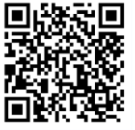
MyFrimleyHealth Record allows you to share access to your records and messages with an appropriate person. They are known as a proxy. Once you've setup your own MyFrimleyHealth Record access you can also request access to the records of a child that you have responsibility for. Please use the QR code below or the following link: MyFrimleyHealth Record to sign up.
Benefits of MyFrimleyHealth Record
While there are many benefits of MyFrimleyHealth record some of the main
benefits are below:
- Send messages to your care team and get answers quickly.
- Ask questions from home, at a time that suits you.
- See your child’s appointments - past and upcoming.
- Check test results without waiting for a phone call or letter.
- Read letters from your clinical team as soon as they are ready.
- Manage your child or young person’s care easily, all in one place.
How to request proxy access for a child or young person who is under 16.
Parents or carers requesting proxy access to a child’s or young person’s record need to complete the form MyFrimleyHealth Record - Sign Up once they have created their own account.
To get access to your child’s health record, first create your own MyFrimleyHealth Record account. Then:
- Log in to your account.
- Go to the menu and select ‘Request Proxy Access for a Child’.
- Fill in your child’s details.
- Upload a photo ID. You can use:
- Your driver’s license (showing your name, date of birth, and address), or
- One document with your name and date of birth (like a passport or birth certificate),
- And one document with your address (like a recent utility bill or bank statement).
5. Upload proof that you are responsible for the child (for example, a birth certificate, court order, or adoption letter).
6. Submit the access and you will hear back from the children’s admin team once they have checked your document. They may contact you if they need more information.
If your child is 16 or older, they must give permission for you to see their health record. If your child cannot give permission (for example, due to illness or disability), please email fhft.myfrimleyhealthrecord@nhs.net for help.
For any queries related to proxy access please contact
Email: Paedsproxyhelpdesk
Phone numbers
- Frimley Admin 0300 613 1944
- Frimley Booking 0300 613 2550
- Wexham Admin 0300 615 6423
- Wexham Booking 0300 615 1550
Contact us
If you have any queries relating to this information, please contact the Paediatrics service.
About this information
Service:
Paediatrics
Reference:
P/090
Approval date:
23 October 2025
Review date:
10 January 2028
Click ‘show accessibility tools’ at the bottom of the page

Then click ‘select language’

Alternative formats
You can use the accessibility toolbar at the bottom of your screen to:
-
Change the text size
-
Adjust the font
-
Modify the colour contrast
-
Use the translate function
If you would like this information in another format, such as Braille, audio, or easy read, please speak to a member of staff.
You can also print as well as download as PDF using the “Print this page” button at the end of the page.
Staff will print a copy for you on request
Important note
This page provides general information only. It is developed by clinical staff and is reviewed regularly every 3 years for accuracy. For personal advice about your health, or if you have any concerns, please speak to your doctor.