

Advice after your nerve block for surgery
On this page…
What is a Dexcom one+ sensor?
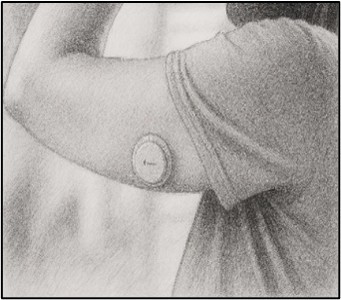
It’s a small plastic sensor that is worn on the back of the upper arm or side of the abdomen that measures your glucose level continuously and sends an automatic reading to a compatible smartphone or reader every few minutes. The information is backed up on a cloud-based management system which can be reviewed by your health care team with your permission.
When the sensor is applied, a thin, flexible, fibre is inserted just under the skin. It is held in place with a small adhesive pad. This is completely painless for most people. You can shower, bathe & play sports whilst wearing the sensor.
Instructions for use:
- Please wear the sensor for at least 7 full days and record everything you eat and drink, plus any exercise you do, during this period
- After 7 days you can stop recording your dietary intake and remove the sensor if you wish. The sensor lasts for 10 days so feel free to wear it for the full duration to learn more about how different foods influence your blood glucose levels. After 7 - 10 days please remove the sensor and place it in a battery waste bin.
- If the sensor falls out before the 7th day please let us know via email or text.
- Please download the Dexcom one+ app on your phone (it is free to download and use)

- Go to App Store (for Apple phones) or Google Play Store (for Android phones
- Search for Dexcom ONE+
- Open the app & follow on-screen instructions to set up an account
- Follow the instructions on the phone app or leaflet (provided inside the sensor box) to insert your sensor. Prior to placing the sensor clean the skin (where the sensor will be placed) using the alcohol wipe provided. Then apply the skin tac wipe to increase stickiness, and place the sensor before the skin tac dries.
IMPORTANT NOTES:
- You’ll need the pairing code on the sensor applicator (as per image shown) to link your phone to the sensor.
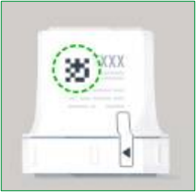
- You will need to leave bluetooth on and the app running in the background on your phone for the full duration of the monitoring period, so please do not swipe the screen up after use, just return to your home screen.
- In practice, we find the sensor may take up to 24 hours to stabilise, during which readings can be less reliable. We also observe that some individuals may record low overnight readings (<3.9 mmol/L) if the sensor is compressed during sleep.
How to set up sharing your Dexcom one+ data with your CF Diabetes team so they can review your results:
- Once you have scanned the QR code on the applicator and inserted the sensor please tap the
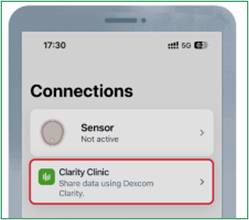
- Tap ‘Clarity clinic’ & then select ‘continue’
- Enter our unique clinic code: 9tq9q04x.
- This will register you on our CF Dexcom Clarity platform so that CF and diabetes specialist clinicians can review your data.
How to change target ranges to match CF targets and silence alerts in the app:
- Navigate to Settings: Open the app, go to Profile, then Alerts.
- Adjust High/Low Thresholds: Select ‘High’ and change the number to 7.8mmol/l. The ‘Low’ number should remain at 3.9mmol/l. When reviewing your data, we look at the amount of time your glucose levels spend outside of this target range (3.9 -7.8mmol/l) and the number of peaks above 11.1 mmol/l.
- To silence Alerts: Click on ‘Low’ alert then change ‘Tone’ to ‘vibrate only’. Then repeat the same steps for ‘High’ alert
Logging your food diary:
Please keep a detailed 7-day food diary whilst wearing the sensor and include any drinks (except water).
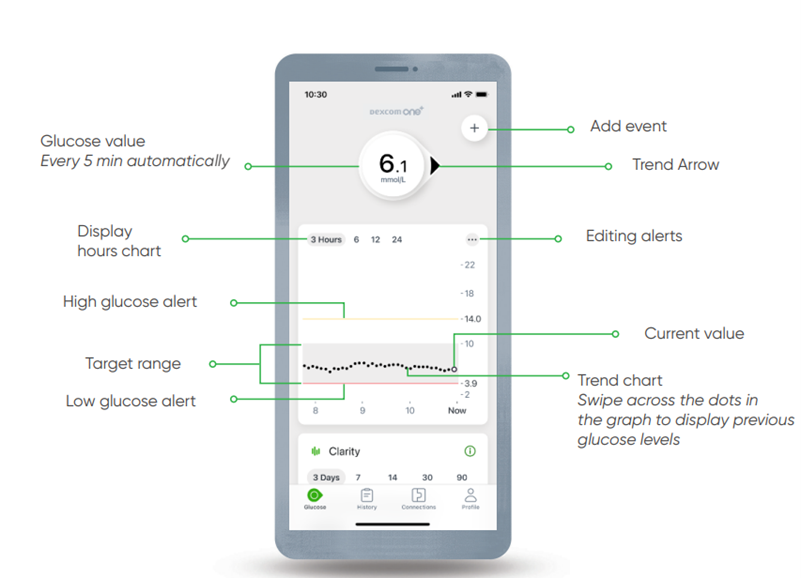
- Tap the + (events) icon which is at the top right of the home screen to log your meals and snacks, including portion sizes. The more information you provide, the more accurately we can interpret changes in your glucose levels.
- Select the option of ‘carbs’ to enter a description of your food (grams of carbohydrate NOT required), ‘health’ (to indicate illness or stress) or ‘activity’ (for work or exercise details). Tap ‘save’ to store the information.
- Alternatively, we can provide you with a paper food diary to complete
How the team will view your data:
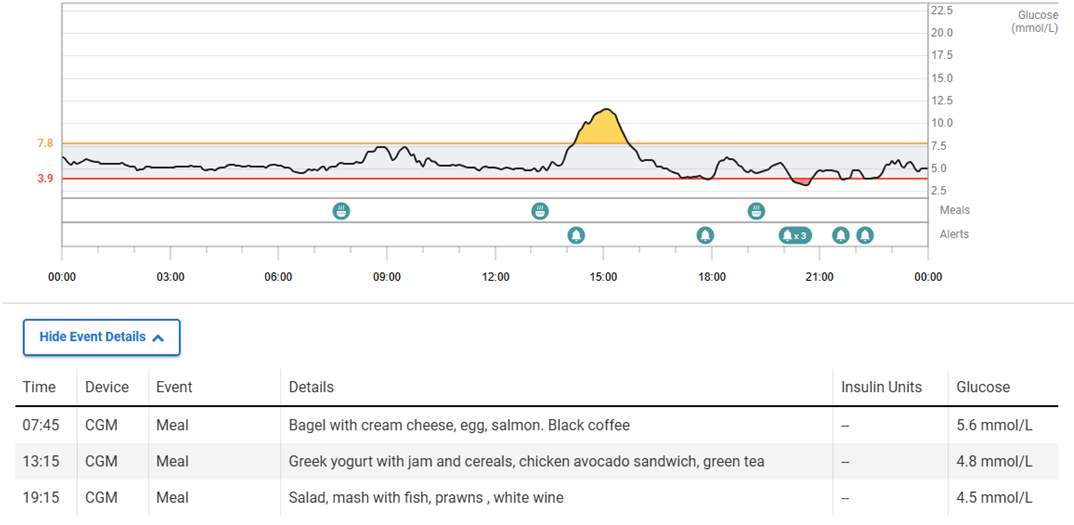
The CF Diabetes team will review your data and discuss it at a monthly meeting with the consultants. We will then feedback your results via phone or email and work collaboratively with you to improve your glucose control.
If you have any concerns during the monitoring period, please get in touch with us:
CF Dietitians Phone number: 0300 613 2635
CF Unit Telephone number: 0300 613 4597
Contact us
If you have any queries relating to this information, please contact the Dietetics service.
About this information
Service:
Dietetics
Reference:
DT/009
Approval date:
1 April 2026
Review date:
1 April 2029
Click ‘show accessibility tools’ at the bottom of the page

Then click ‘select language’

Alternative formats
You can use the accessibility toolbar at the bottom of your screen to:
-
Change the text size
-
Adjust the font
-
Modify the colour contrast
-
Use the translate function
If you would like this information in another format, such as Braille, audio, or easy read, please speak to a member of staff.
You can also print as well as download as PDF using the “Print this page” button at the end of the page.
Staff will print a copy for you on request
Important note
This page provides general information only. It is developed by clinical staff and is reviewed regularly every 3 years for accuracy. For personal advice about your health, or if you have any concerns, please speak to your doctor.