

Advice after your nerve block for surgery
On this page…
What is Colonoscopy?
A colonoscopy is a test that uses a narrow, flexible, telescopic camera called a colonoscope to look at the lining of your large bowel. A colonoscopy can be used to detect irritated and swollen tissue, ulcers, or growths such as polyps. It helps to diagnose or exclude health conditions like Crohn’s disease, ulcerative colitis, diverticular disease and bowel cancer
Bowel Preparation
Bowel preparation medicine, which is a laxative, needs to be taken before procedures such as colonoscopy, flexible sigmoidoscopy or CT colonography to cleanse and empty the bowel.
To get a clear view of the lining of your bowel, it must be as empty and as clean as possible. To achieve this, you will need to follow a low fibre diet for 2 days and take the laxatives included in your pack. The laxatives will give you watery diarrhoea so you must drink adequate fluids and stay close to a toilet.
Importance of proper cleansing
A clean bowel will allow for a clear view of its inner lining which is important for both accurate diagnosis and treatment. Abnormal changes may be tiny, so even the smallest amount of faeces could potentially disguise something important. If the bowel is not empty and clean enough, the procedure may have to be cancelled and repeated on another occasion at a later date
What is Plenvu
Each box contains 3 sachets, making up dose 1 (1 sachet), and dose 2 (sachets A & B).
Taking Plenvu before your appointment will give you a clean bowel.
After you drink Plenvu you will have lots of watery bowel movements, so stay near a toilet because you may need to use it urgently.
Dietary Advice
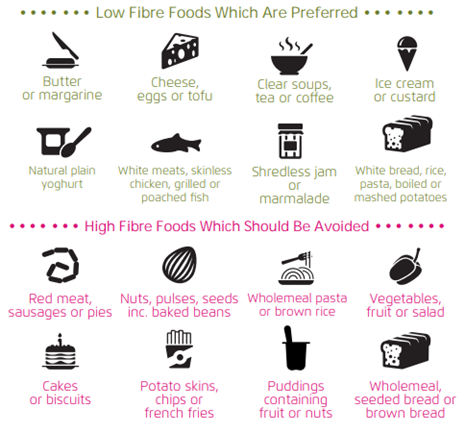
For specialised diets, please refer to your healthcare professional
Patient Advice – Clear Fluids
You must drink an extra minimum of 500ml of clear fluids with each dose of Plenvu. Continue drinking clear fluids to keep yourself hydrated until 2 hours before your procedure.
Clear drinks may include:
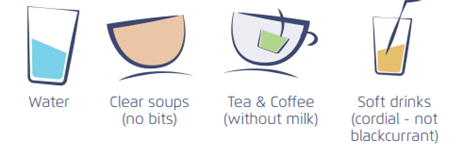
DO NOT drink alcoholic beverages.
Plenvu may be easier to take when:
• Adding cordial (to alter the flavour, but not blackcurrant as it will stain the bowel)
• It has been chilled once it has been made up
Hints and Tips
- Once dissolved (this may take up to 8 minutes) the solution can be refrigerated
- Try using a straw
- Sip the Plenvu solution very slowly over 60 minutes alongside a minimum of 500 ml clear fluids (you can alternate between sips of Plenvu and clear fluid if you’d like)
- Stay hydrated with plenty of clear fluids
- Use wet wipes after each bowel movement
- Use a barrier cream to prevent a ‘sore bottom’ for example: petroleum jelly
How to prepare your Plenvu
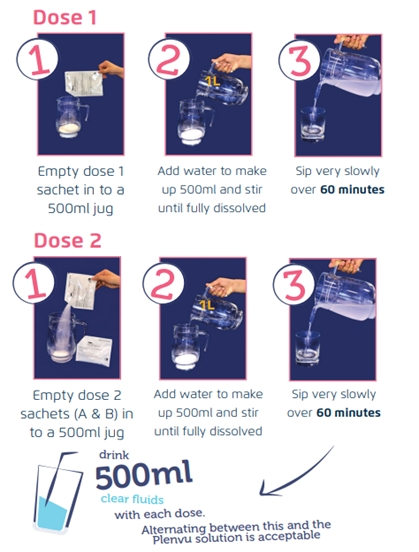
When to take your Plenvu
Stay on a Low Fibre Diet on the day before your procedure until 15:00. (See Dietary Advice for more information.)
Start your Fasting Period from 15:00 (the day before your procedure). Continue to drink Clear Liquids, stopping only 2 hours before your procedure.
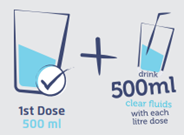

Take your First Dose of Plenvu at 20:00, followed by 500ml of clear fluids.
Try to get some sleep.
If your procedure is scheduled in the morning (before 14:00), take your Second dose of Plenvu at 5:30 am on the day of your procedure.
If your procedure is scheduled in the afternoon (from 14:00 onwards), take your Second dose of Plenvu at 8:00 am.
DO NOT EAT OR DRINK
2 hours before your procedure.

Reporting side effects
If you get any side effects, talk to your doctor, pharmacist or nurse. This includes any possible side effects not listed in the package leaflet. You can also report side effects directly via the Yellow Card Scheme at www.
Contact us
If you have any queries relating to this information, please contact the Endoscopy service.
About this information
Service:
Endoscopy
Reference:
H/085
Approval date:
10 January 2025
Review date:
10 January 2028
Click ‘show accessibility tools’ at the bottom of the page

Then click ‘select language’

Alternative formats
You can use the accessibility toolbar at the bottom of your screen to:
-
Change the text size
-
Adjust the font
-
Modify the colour contrast
-
Use the translate function
If you would like this information in another format, such as Braille, audio, or easy read, please speak to a member of staff.
You can also print as well as download as PDF using the “Print this page” button at the end of the page.
Staff will print a copy for you on request
Important note
This page provides general information only. It is developed by clinical staff and is reviewed regularly every 3 years for accuracy. For personal advice about your health, or if you have any concerns, please speak to your doctor.