

Advice after your nerve block for surgery
On this page…
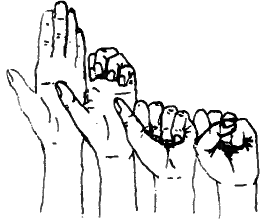 |
1. Finger hook to fist flexion
|
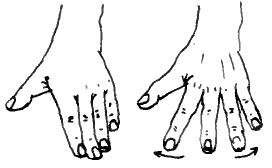 |
2. Finger and thumb span
|
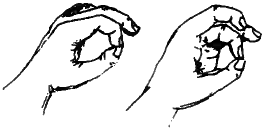 |
3. Opposing the fingers
|
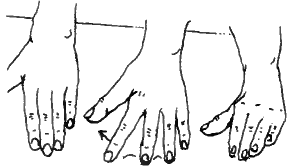 |
4. Finger walking towards your thumb
|
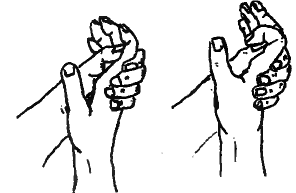 |
5. Isolated finger bends
|
The exercises should be performed in a slow, controlled manner. They should not cause you pain. An ache or pull is normal and this should subside within half an hour of finishing the exercises.
If you are feeling an ache for longer than this or are experiencing pain you should try reducing the number of exercises you do each time or decrease how far you push each exercise.
Contact details
Hand therapy departments:
0300 6133396 for Frimley
0300 6140540 then Option 2 Wexham or Option 3 for Heatherwood
Contact us
If you have any queries relating to this information, please contact the Hand therapy service.
About this information
Service:
Hand therapy
Reference:
UU/118
Approval date:
27 February 2026
Review date:
1 February 2029
Click ‘show accessibility tools’ at the bottom of the page

Then click ‘select language’

Alternative formats
You can use the accessibility toolbar at the bottom of your screen to:
-
Change the text size
-
Adjust the font
-
Modify the colour contrast
-
Use the translate function
If you would like this information in another format, such as Braille, audio, or easy read, please speak to a member of staff.
You can also print as well as download as PDF using the “Print this page” button at the end of the page.
Staff will print a copy for you on request
Important note
This page provides general information only. It is developed by clinical staff and is reviewed regularly every 3 years for accuracy. For personal advice about your health, or if you have any concerns, please speak to your doctor.