

Advice after your nerve block for surgery
On this page…
Review of Glucose Tolerance by the Cystic Fibrosis Diabetes Team
As discussed we would like to review your glucose tolerance levels in order to investigate whether the way your body handles glucose could be causing problems to your overall health.
We may have offered you this review if your Oral Glucose Tolerance Test (OGTT) indicated a possible need or if you have been diagnosed with Cystic Fibrosis Diabetes (CFD) already & are using oral tablets to treat your diabetes, as we like to review your control at least annually.
Too much glucose in your body leads to too much glucose in your lung secretions, as well as other bodily fluids. This can cause your secretions to be thicker, stickier & harder to clear, thus affecting lung function. Bacteria also thrives in sugary environments so you may be more prone to developing infections & they may be harder to treat.
Doing this investigation into your blood glucose handling will allow us to identify any problems areas & offer advice/treatments on how to manage this. If the results do show you have CFD you will be fully supported by our CF diabetes team on how best to manage this, in order to maintain your health goals.
What is a Freestyle Libre sensor (FSL2+)?
It’s a small plastic sensor that is worn on the back of the upper arm. It monitors your glucose level every minute & saves information every 15 minutes to a cloud-based 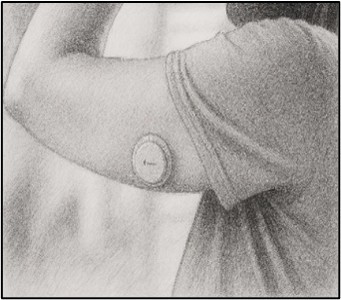
When the sensor is applied, a thin, flexible & sterile fibre is inserted just under the skin. It is held in place with a small adhesive pad. This is completely painless for most people
Instructions for use:
- Please wear the sensor for 7 days, after that you can peel it off, wipe it clean with disinfectant & place it in electrical waste (same as a battery).
- You can shower, bathe & play sports whilst wearing the sensor.
- Please download the Freestyle LibreLink App (see below for step-by-step instructions) & register an account so that you can use your smartphone to scan your sensor.
How to set up the Freestyle Libre app on your phone (note it is free to download & use):
|
Apple phone:
|
Android phone:
|
- Prior to placing the sensor clean the skin (where the sensor will be placed) using the alcohol wipe provided. Then apply the skin tac wipe to increase stickiness, and place the sensor before the skin tac dries.
- To place the sensor follow the step by step instructions on the app.
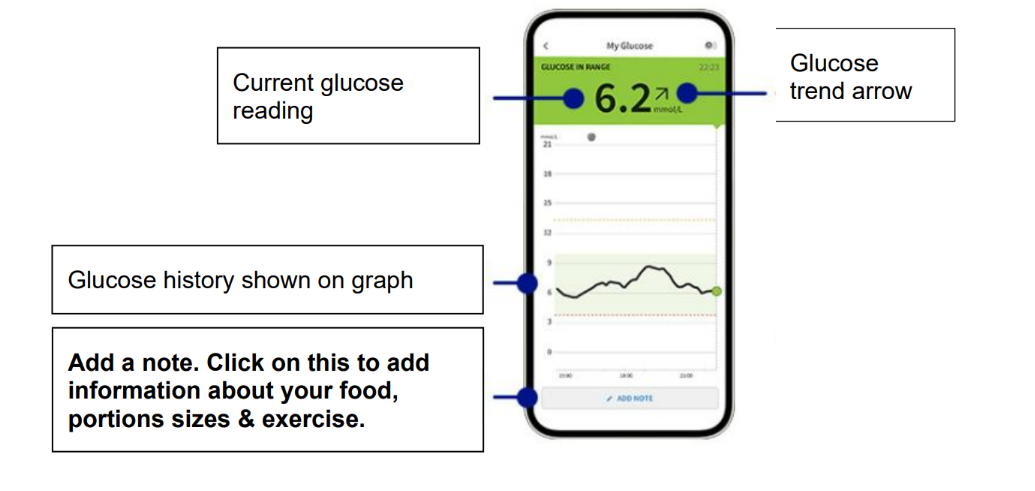
- Scanning the sensor will initiate it & then you need to leave the App open on your phone so you can review the results.
- Once you have downloaded the App please go to ‘settings’ (found in left drop down menu), then select ‘report settings’ & change the target glucose range to 3.9 – 7.8mmol/l, which is the diagnostic target range for CFD. In reviewing your data we look at the amount of time your glucose levels spend out of this target range (above & below) & the number of peaks above 11.1mmol/l.
As well as wearing a FSL2+ sensor to record your glucose levels we would like you to keep a 7-day food diary & include any drinks except water. See table below for more information:
|
Times to view/look at the app to see your FSL2+ data |
|
|
Food diary |
|
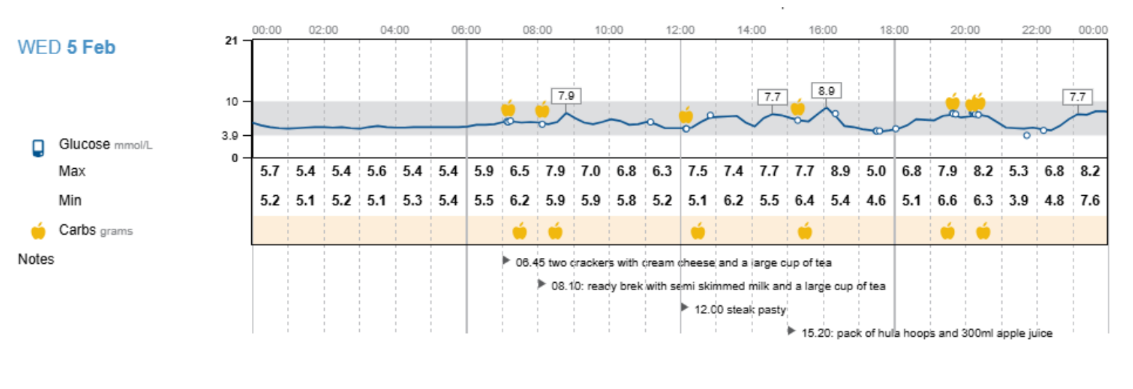
How to annotate your FSL2+ with your food diary
Example of annotated Libreview data:
How to set up sharing your FSL2+ data with your CFDR team so they can review your results:
- Once you have the sensor inserted & have scanned it to initiate it, please scroll down to the bottom of the menu list where it says ‘connected Apps’
- Click on this & select ‘LibreView’
- Select ‘connect to a practice’ & enter ID code ‘12941567.’ This will register you on our CF Libreview so that only CF & diabetes specialist clinicians can review your data.
- After 7 days you can stop recording your dietary intake & remove the sensor if you wish. The sensor lasts for 15 days so you can continue to wear it to learn about how different foods influence your blood glucose levels. After 7 / 15 days please remove the sensor, wipe it down with disinfectant & dispose of in electrical waste (like a battery).
- If the sensor falls out before the 7th day please let us know via email or text.
The CFD team will review your notes & discuss them at a monthly MDT meeting with the Consultants. We will then feedback your results via phone or email & work collaboratively with you to improve your glucose control.
If you have any concerns during the monitoring period please do get in contact with us:
CF Dietitians Phone number: 0300 613 2635
CF Unit Telephone number: 0300 613 4597
Contact us
If you have any queries relating to this information, please contact the Dietetics service.
About this information
Service:
Dietetics
Reference:
DT/010
Approval date:
1 April 2026
Review date:
1 April 2029
Click ‘show accessibility tools’ at the bottom of the page

Then click ‘select language’

Alternative formats
You can use the accessibility toolbar at the bottom of your screen to:
-
Change the text size
-
Adjust the font
-
Modify the colour contrast
-
Use the translate function
If you would like this information in another format, such as Braille, audio, or easy read, please speak to a member of staff.
You can also print as well as download as PDF using the “Print this page” button at the end of the page.
Staff will print a copy for you on request
Important note
This page provides general information only. It is developed by clinical staff and is reviewed regularly every 3 years for accuracy. For personal advice about your health, or if you have any concerns, please speak to your doctor.