

Paediatric ECG requests: guidance
Reason for reminder: Referral documents are not always being saved and uploaded to eRS in line with national guidance and CSU training materials. Below are two examples of how documents can appear in eRS, and Epic for the FHFT clinician triaging the referral, when the correct process is not followed:
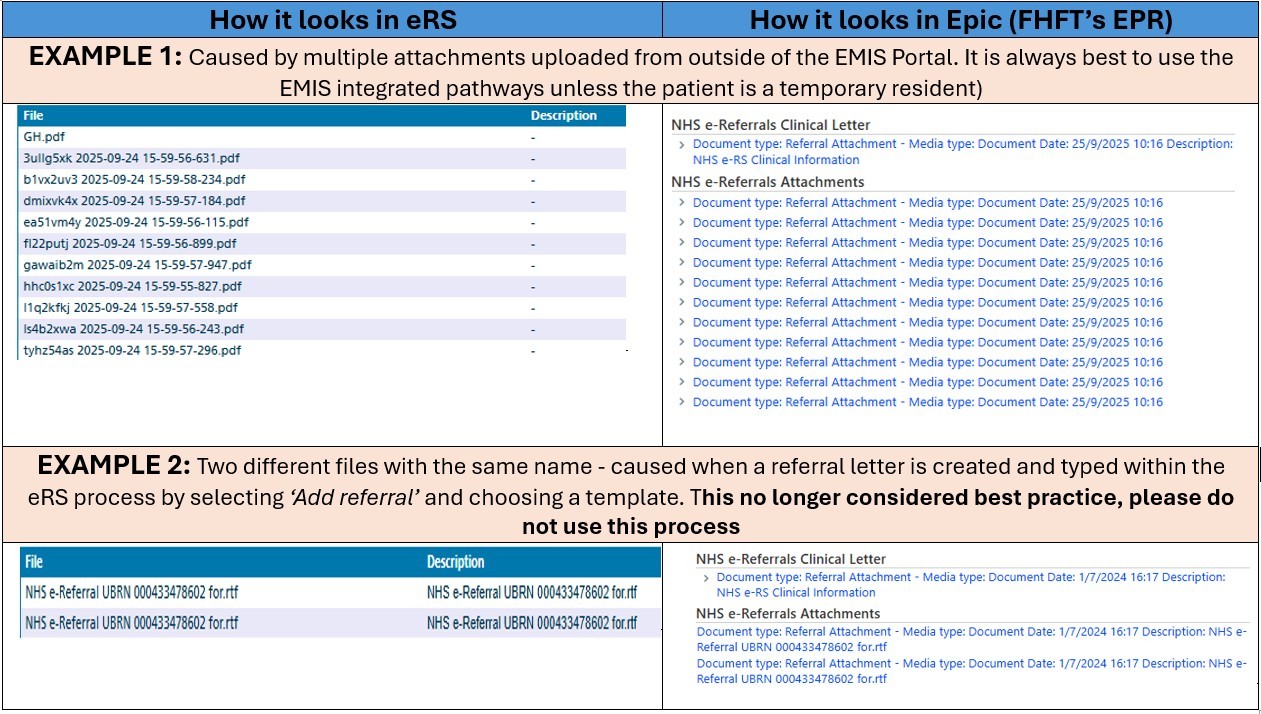
Why this matters: This can make FHFT clinical triage significantly less efficient and delay the patient pathway if FHFT clinicians cannot easily identify the information needed. Clearly named files help FHFT/secondary care clinicians identify the referral letter or proforma quickly, along with any other relevant clinical information.
Asks of Primary Care: Please follow the guide – which details the correct process for attaching and ensuring documentation is clearly named in eRS, along with how to reduce file sizes
Other relevant requests:
- Keep attachments to a minimum
- Ensure documentation is clearly named
- Ensure attachments shared meet eRS file size standards - there are two limits:1MB per attachment and 5MB in total across all attachments. If either of these limits are exceeded, the referral will not be successfully transferred to the eRS portal. Please find guidance here
- Where available, we encourage the use of the DXS / Ardens referral forms and pathways - which have been developed and agreed collaboratively to include essential key information in a standardised format to support a smooth patient pathway to the most appropriate setting. DXS forms are dynamic and key information is auto populated from your patient management system (e.g. EMIS) into the form.
- Where key information is essential for triage, where possible, include this in the actual referral form/letter or A&G text, rather than relying only on additional attachments.
- Do not attach information already held by FHFT (e.g. a FHFT clinic letter or discharge) unless it is specifically relevant to the clinical question. External letters or results from other providers may be helpful where relevant.
Further Primary Care Support and urgent eRS queries please contact the CSU Training Team:
- Email: training.scwcsu@nhs.net
- Website: http://
training.scwcsu.nhs.uk
ICB Referrals & DXS Support (covering Thames Valley, HIOW and S&S) - Rose Elhamamy - rose.
eRS National Training Forum – Resources
| Training specific queries | |
|---|---|
| System queries – discuss with ICB / local IT teams in the first instance who will make contact with the national team if required. | enquiries. |
| Information for referrers | https:// |
| Information for providers | https:// |
| Optimising eRS | https:// |
| Document library | https:// |
| System help | NHS e-Referrals service |
| Dashboards / reports | https:// |
| User feedback- make a suggestion or vote on a suggested change or sign up to the user research panel |